CARRIER REVIEW EVIDENCE
Workout-text opt-in
Disclosure version lineup-workout-texts-2026-08-07-v3
Public website workflow
- An attendee opens a public
joinmylineup.com/w/<workout-link>page. The workout is readable without signing in. - They choose I’m in. A compact sheet asks for their name and US mobile number.
- Lineup verifies the mobile number with a one-time authentication code and saves the going or waitlisted RSVP. Phone verification does not enroll the attendee in workout texts.
- Only after the RSVP is saved, Lineup shows the separate workout-text option below. It is unchecked by default. The attendee may choose No thanks and keep their RSVP without enrolling.
- If the attendee checks the option and independently chooses Turn on workout texts, Lineup records the consent shown below.
Exact consent control
This screenshot was captured from the actual public RSVP component after phone verification and after the RSVP was saved. The optional control is separate from authentication and attendance.
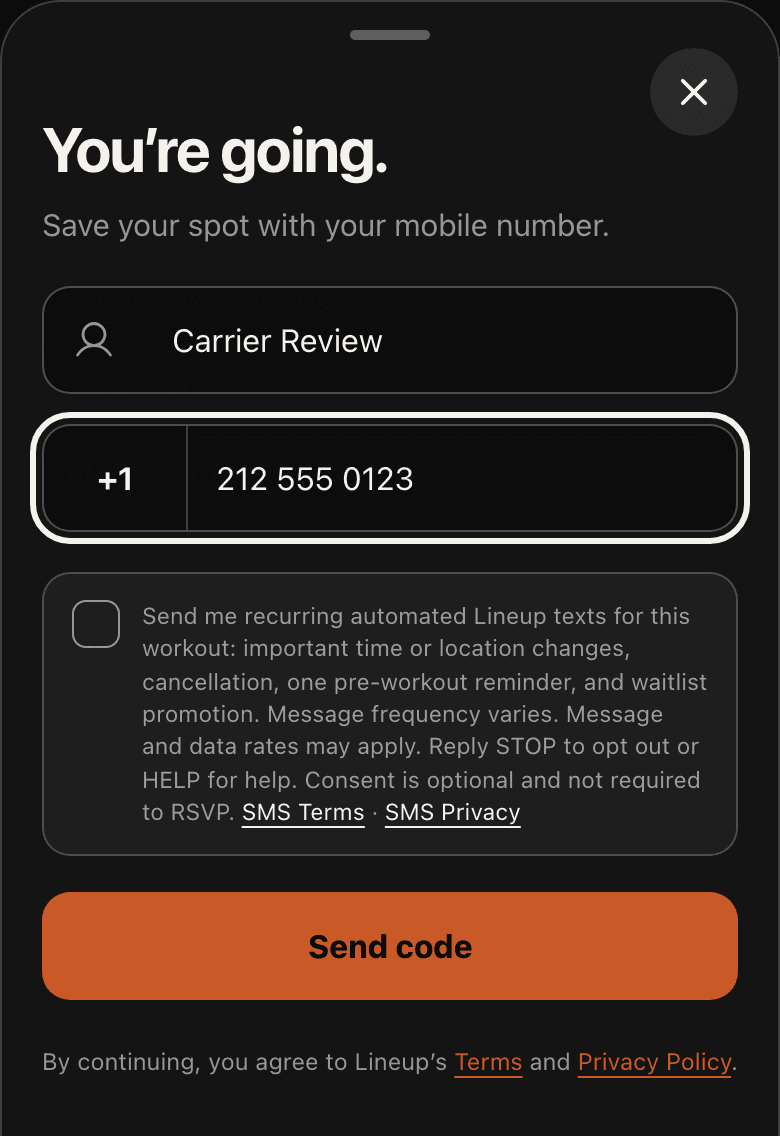
Accessible text copy
Consent record
For a checked option followed by Turn on workout texts, Lineup records the verified user, workout, verified destination, consent timestamp, disclosure version, and exact public workout URL. An unchecked option or No thanks creates no subscription. Choosing I’m out cannot create a subscription, and changing an RSVP to out disables the event subscription.
Message scope and policies
Lineup sends only automated informational texts for the joined workout: important time or location changes, cancellation, one pre-workout reminder, and a waitlist status update when a place becomes available. Message frequency varies. Message and data rates may apply. Reply STOP to opt out or HELP for help.
No mobile information will be shared with third parties or affiliates for marketing or promotional purposes.
All the above categories exclude text messaging originator opt-in data and consent; this information won’t be shared with any third parties.
SMS program · SMS Terms · SMS Privacy
Lineup is operated by Alistair Gillespie. Support: hello@alistairgillespie.io.